
GST Formulas & Examples
How to Calculate GST in Australia — Formulas, Examples & Excel Tips
GST (Goods and Services Tax) is a flat 10% tax on most goods and services in Australia. If you’re a business owner preparing invoices, a sole trader quoting a job, an accountant checking the numbers, or a consumer verifying a receipt — you need to know three formulas.
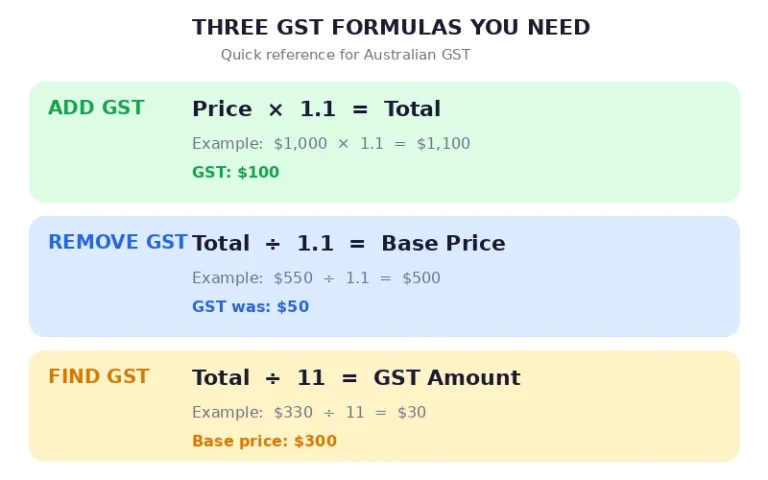
To add GST in Australia, multiply the base price by 1.1. To remove GST, divide by 1.1. To find the GST component, divide by 11.
That’s it. Every GST calculation in Australia comes back to one of those three operations. This guide walks through each one with worked examples, shows you the Excel formulas, explains the common mistake that costs people money, and covers tricky scenarios like commissions, shipping, and rounding.
That’s it. Every GST calculation in Australia comes back to one of those three operations. This guide walks through each one with worked examples, shows you the Excel formulas, explains the common mistake that costs people money, and covers tricky scenarios like commissions, shipping, and rounding.
Formula 1
How to Add GST to a Price
Add GST
Base Price × 1.1 = GST-Inclusive Price
Or in two steps: Base Price + (Base Price × 0.10). Both give the same result — the single-step method is faster.
|
Base Price (ex GST) |
GST (10%) |
Total (inc GST) |
|---|---|---|
|
$100 |
$10.00 |
$110.00 |
|
$450 |
$45.00 |
$495.00 |
|
$1,000 |
$100.00 |
$1,100.00 |
|
$27,500 |
$2,750.00 |
$30,250.00 |
The multiplier 1.1 works because you’re adding 10% in a single operation. Think of it as 100% of the base plus 10% GST = 110% = 1.1.
How much is $5,000 plus GST?
$5,000 × 1.1 = $5,500. The GST component is $500. This works for any amount — just multiply by 1.1.
Formula 2
How to Remove GST from a Price
Remove GST
GST-Inclusive Price ÷ 1.1 = GST-Exclusive Price
This is the reverse of adding GST. You’re dividing by 1.1 to strip out the 10% that was added.
|
Total (inc GST) |
GST Component |
Base Price (ex GST) |
|---|---|---|
|
$55 |
$5.00 |
$50.00 |
|
$220 |
$20.00 |
$200.00 |
|
$1,100 |
$100.00 |
$1,000.00 |
|
$33,000 |
$3,000.00 |
$30,000.00 |
How to calculate GST from total?
Divide the GST-inclusive total by 1.1 to find the base price, or divide by 11 to find just the GST amount. For example, $330 ÷ 1.1 = $300 (base price), or $330 ÷ 11 = $30 (GST component).
Formula 3
How to Find the GST Amount in a Price
Find the GST
GST-Inclusive Price ÷ 11 = GST Amount
Why 11? Because the GST-inclusive total has 11 equal parts: 10 parts are the base price and 1 part is the GST. Dividing by 11 isolates that single GST part.
|
Total (inc GST) |
GST Component (÷ 11) |
Base Price |
|---|---|---|
|
$110 |
$10.00 |
$100.00 |
|
$330 |
$30.00 |
$300.00 |
|
$2,750 |
$250.00 |
$2,500.00 |
|
$55,000 |
$5,000.00 |
$50,000.00 |
This is the formula bookkeepers use most often — you have a receipt showing the total and you need to extract the GST for your BAS.
Why do you divide by 11 for GST?
Because GST is 10% of the base price, and the total is the base price plus that 10%. So the total equals 110% of the base (11 parts). The GST alone is 1 of those 11 parts.
For a deeper explanation of why the formula uses 11, see our guide to why you divide by 11 for GST.
Common Mistake
Why You Can’t Just Subtract 10% to Remove GST
This is the most common GST calculation error in Australia. It trips up business owners, consumers, and even some bookkeepers.
The instinct is simple: “GST is 10%, so I’ll subtract 10% from the total to find the base price.” Sounds logical. It’s wrong.
|
Wrong Method |
Correct Method |
|
|---|---|---|
|
Starting amount |
$220 (inc GST) |
$220 (inc GST) |
|
Calculation |
$220 − 10% = $198 |
$220 ÷ 1.1 = $200 |
|
GST calculated |
$22 |
$20 |
|
Result |
$2 too much |
✓ Correct |
Why the difference? GST is 10% of the base price, not 10% of the total. Since the total already includes the GST, 10% of the total is a larger number than the actual GST.
The error scales with the amount:
|
Amount (inc GST) |
Wrong (−10%) |
Correct (÷1.1) |
Error |
|---|---|---|---|
|
$220 |
$198 |
$200 |
$2.00 |
|
$1,100 |
$990 |
$1,000 |
$9.09 |
|
$11,000 |
$9,900 |
$10,000 |
$90.91 |
|
$110,000 |
$99,000 |
$100,000 |
$909.09 |
On a $500,000 property transaction, the wrong method produces a $4,545 error. That’s real money.
Why can’t I just subtract 10% to remove GST?
Because GST is 10% of the base price, not 10% of the total. The total already includes GST, so 10% of the total is a larger number than the actual GST. For example, 10% of $220 is $22, but the actual GST in $220 is only $20 ($220 ÷ 11). The correct method is to divide by 1.1.
Spreadsheets
How to Calculate GST in Excel
Three formulas cover everything. Assume your amount is in cell A1.
|
What You Need |
Excel Formula |
Example |
|---|---|---|
|
Add GST |
=A1*1.1 |
=1000*1.1 → 1100 |
|
Remove GST (find base) |
=A1/1.1 |
=550/1.1 → 500 |
|
Find GST component |
=A1/11 |
=330/11 → 30 |
These work because Australian GST is always 10%. For Google Sheets, the formulas are identical.
To format results as Australian currency, select the cells and apply the Accounting format with $ symbol and 2 decimal places.
How do I calculate GST in Excel?
Use =A1*1.1 to add GST, =A1/1.1 to remove GST, or =A1/11 to find the GST component, where A1 contains your amount.
Real-World Scenarios
Calculating GST on Commissions, Shipping & Invoices
Example 1 — Commission with bonus
A GST-registered agency earns a commission on a $1,000 tuition fee. There’s a $500 bonus deducted before commission calculation. The commission rate is 20%.
Step 1: $1,000 − $500 bonus = $500 commissionable amount
Step 2: $500 × 20% = $100 commission
Step 3: GST on commission = $100 × 10% = $10
Step 4: Total payable to agency = $100 + $10 = $110
The key point: GST is calculated on the commission amount, not the tuition fee.
Example 2 — Shipping
Product price: $20 (ex GST). Shipping: $10 (ex GST). Total taxable supply: $30. GST = $30 × 10% = $3. Customer pays $33.
Shipping is part of the taxable supply — you can’t treat it separately.
Example 3 — Sole trader invoice
Your service fee: $500 (ex GST). GST: $500 × 10% = $50. Invoice total: $550.
GST doesn’t “come out of your pocket” — you charge $550, keep $500, and remit $50 to the ATO. The customer bears the cost.
ATO Rules
GST Rounding Rules
The ATO requires GST to be rounded to the nearest cent. This creates an interesting quirk: certain cent amounts have no valid GST-inclusive price.
For example, 94 cents before GST becomes $1.034 including GST, which rounds to $1.03. But 95 cents before GST becomes $1.045, which rounds to $1.05 — skipping $1.04 entirely.
In practice, this only matters for businesses pricing individual items at odd cent values. Most businesses price in whole dollars or common decimal amounts where rounding works cleanly.
Your POS system and accounting software should handle ATO-compliant rounding automatically. If you’re building invoices manually, round GST amounts to the nearest cent using standard rounding (0.005 rounds up).
No Calculator Handy?
How to Calculate GST Without a Calculator
The simplest mental shortcut: move the decimal point one place to the left to find 10%.
Example: $450 → move decimal → $45.00 is the GST. Total = $450 + $45 = $495.
For removing GST, the quickest mental estimate is dividing by 11. For $330: think “330 divided by 11 is 30” — so $30 is the GST and $300 is the base price.
For amounts that don’t divide cleanly by 11, round to the nearest easy number. $500 including GST: $500 ÷ 11 ≈ $45.45 GST. Not as clean, but close enough for a quick check.
How do I calculate GST manually?
Move the decimal one place left to find 10%. For $450, that’s $45 GST. For reverse calculation, divide the total by 11 to find the GST component.
Frequently Asked Questions